

2026.07.08
LINE Official Account
LY Ads
LINE Ads
Announcement
Updates
- July 8, 2026: The implementation of this update has been completed, and this article has been updated.
- July 3, 2026: This article was published.
Product
- LINE Official Account
- LY Ads
- LINE Ads
*This applies to all services that use Business ID for sign-in.
Schedule
July 7, 2026 (Tuesday)
Summary
Business ID sign-in will support passkey authentication.
A passkey is a feature that enables passwordless sign-in using facial recognition, fingerprint authentication, or a smartphone app. It provides a more secure sign-in experience while eliminating the need to enter a password.
To use a passkey with your Business ID, you must first register a passkey from the profile page. After registration, you can sign in using the passkey by clicking the "Sign in with a passkey" button on the sing-in screen.
The following image shows the screen after the implementation date.
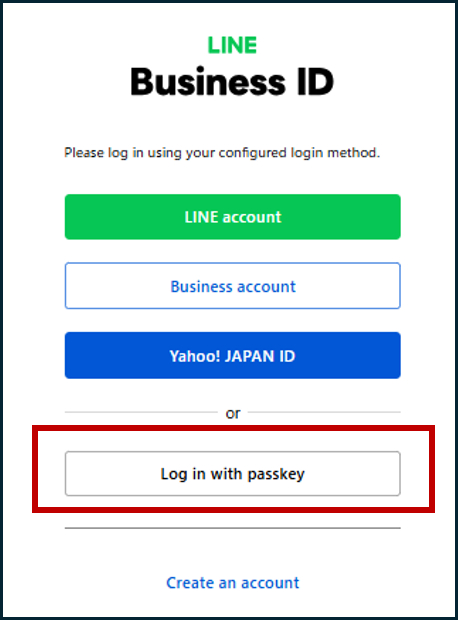
A passkey is a feature that enables passwordless sign-in using facial recognition, fingerprint authentication, or a smartphone app. It provides a more secure sign-in experience while eliminating the need to enter a password.
To use a passkey with your Business ID, you must first register a passkey from the profile page. After registration, you can sign in using the passkey by clicking the "Sign in with a passkey" button on the sing-in screen.
The following image shows the screen after the implementation date.
If you are already using passkeys, we encourage you to use them when signing in with your Business ID as well.
Comments
- You can register multiple passkeys and rename them after registration. After signing in with your Business ID, manage your passkeys from the Profile page.
- To use passkeys, please use the latest version of a passkey-compatible browser, such as Google Chrome.
- Related Tag:
- #LINE Official Account #LY Ads #LINE Ads